Before you choose a TV package: five things that matter most
The right TV package is not necessarily the biggest one. For many households, the better question is what you actually watch, whether you need sports, and whether it makes sense to bundle TV and internet in one agreement.

A cheap TV package can be a good choice if you only want a few regular channels and a simple setup at home. But the cheapest TV package is not always the cheapest in real life if sports, movies, a TV box, extra channels or a higher price after the campaign period come on top.
That is why you should start with your everyday habits, not the advertising. Do you mostly watch news and Norwegian channels? Does your family need children’s TV and several screens? Do you want to follow the Premier League, Champions League or other sports? Or do you mostly use Netflix, YouTube and other streaming services?
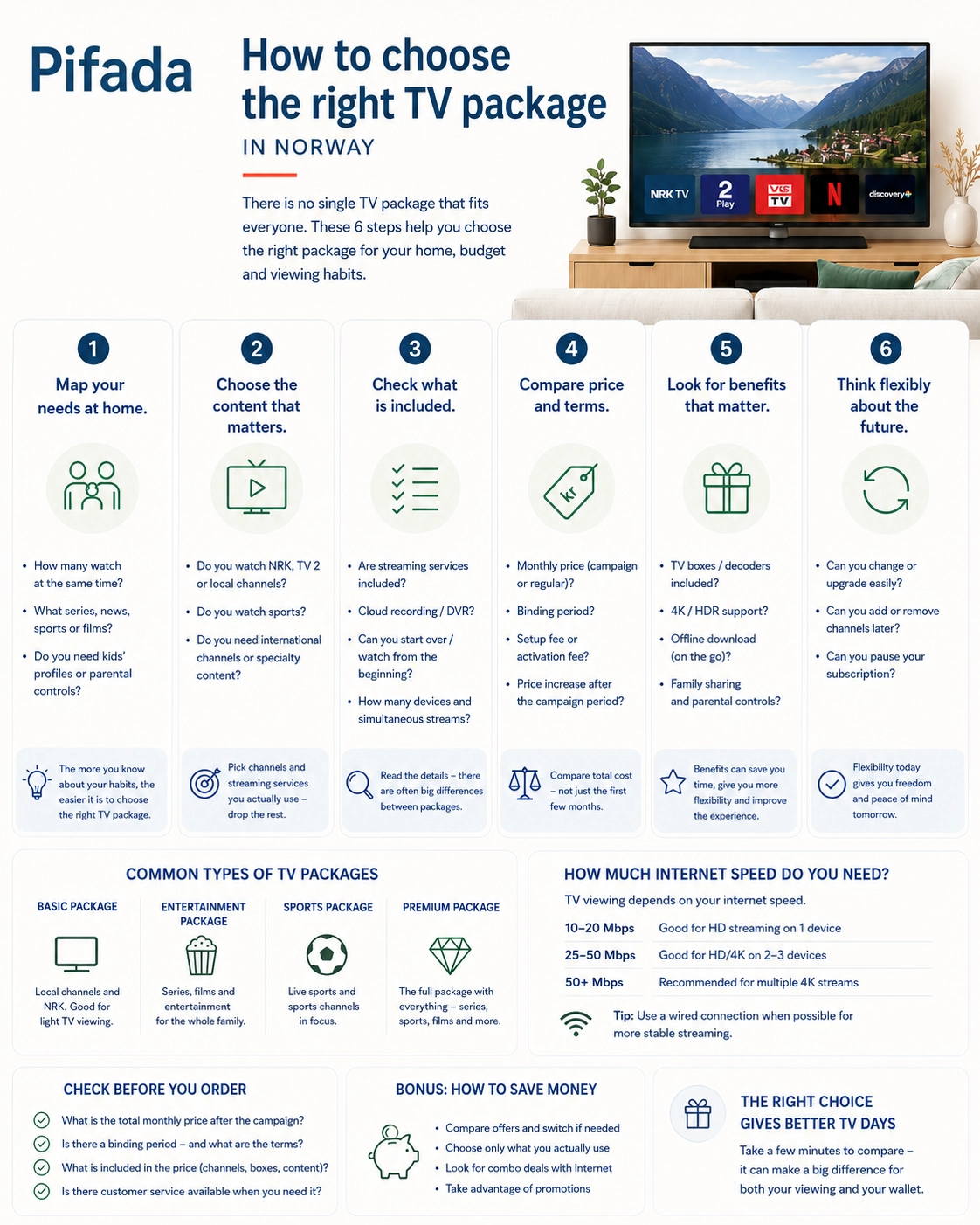
This guide helps you understand which TV packages may make sense in Norway, when streaming may be enough, and when TV together with broadband can be practical. The goal is not to find one “best TV package” for everyone, but to make it easier to choose a solution that fits your home, your address, your internet connection and your budget over time.
Transparency: Pifada may contain advertising links. This means that we may receive a commission if you click through and buy or order something from a partner. It does not cost you more. Our recommendations are based on practical criteria, not on who pays the most. Read more on our Affiliate links page.
Before you choose a TV package: five things that matter most
Before you compare TV packages, you should know what you actually need. A large channel package can feel safe, but it is not necessarily better than a simpler solution with fewer channels, a lower price and more flexibility.

Use these five points as a simple TV package guide before you order or switch subscription:
- What do you actually watch? Sports, news, children’s TV, movies, series, Norwegian channels and streaming all point you in different directions. If you only watch a few channels, you probably do not need the largest package.
- Do you need live TV channels? If you rarely watch live TV, a full channel package may be more than you need. Streaming or a smaller solution may be enough.
- Should TV and internet be bundled? One agreement and one invoice can be practical, but it is not always cheapest. Compare the total price, not just the monthly price shown first.
- Do you want a TV box, an app or both? Some people prefer a simple remote control and a traditional TV experience. Others would rather use a smart TV, phone, tablet or Chromecast without an extra box.
- What does the package cost after the campaign period? Campaign price, binding period, sports, TV box, add-on packages and normal price can matter more than the package name itself.
In short: do not start by asking which TV package is the biggest. Start with what you actually watch, what can be delivered where you live, and what the package will cost once the campaign period is over.

What is a TV package today?
When people search for a TV package, they often mean slightly different things. For some, it is a classic channel package with regular TV channels. For others, it is a digital TV package with an app, streaming services, sports and the option to watch content on several screens.
A TV package can be delivered in several ways. Some households get TV through fiber or cable. Others use antenna, satellite dish or a TV package app on a smart TV, phone or tablet. What works best depends on your address, your internet connection and how you actually watch TV in everyday life.
Many TV packages are not just about channels either. They may include fixed channels, optional channels or points, streaming services, a TV box, an app and add-ons for sports or movies. This means that two packages with similar monthly prices can offer very different value in practice.
Some people also choose TV as part of a larger broadband agreement. That can be practical if you want TV and internet from one provider, but it also makes comparison a little harder. In that case, you need to look at the whole agreement, not just the TV package alone.

In short: a TV package today can be anything from a simple channel package to an online TV package with an app, streaming and broadband in the same solution. That is why you should first find out what you actually need before comparing names, prices and channel lists.
TV package or streaming: what suits you best?
The choice is often between a regular TV package, pure streaming or a mix of both. There is no single right answer for everyone. It depends on whether you want live TV, how important sports are, how many people use screens at home, and how much flexibility you want.
A good place to start is with the subscriptions you already pay for. Do you have several streaming services, but only use one of them regularly? Or do you pay for a TV package with many channels you never open? Small changes here can do more for your monthly budget than chasing the cheapest TV and streaming solution in the ads.
Before you commit to a new agreement, you should also read the terms for binding period, cancellation and campaign price. Forbrukerrådet provides general guidance on consumer rights and agreements, and it is worth checking if you are unsure what you are actually agreeing to.

When a TV package can be smart
A TV package can be a good choice if you watch a lot of live channels, news, sports or children’s TV. It also suits people who want a simple solution where channels, recordings, TV guide and perhaps some streaming services are gathered in one place.
This is especially practical in homes where different people watch different things. One person wants Norwegian channels, one follows sports, and the children want safe children’s programming without anyone having to jump between five apps. In that case, a bundled TV solution with the right channels can be more manageable than many small subscriptions.
When streaming may be enough
Streaming may be enough if you rarely watch live TV. If you live alone, are a student, have a small apartment or mostly watch movies, series and YouTube when it suits you, a channel package with many TV channels may be more than you need.
Another advantage is flexibility. You can often start and stop streaming services as needed, and you usually avoid a TV box if you use a smart TV, phone, tablet or Chromecast. Still, be a little careful: three or four small streaming subscriptions can quickly cost more than you think if they just keep running in the background.

When a combination makes most sense
For many homes, the real choice is not TV package or streaming. The most practical option may be a smaller TV package with the channels you actually use, combined with one or two streaming services for movies and series. That gives you easy access to live TV and the freedom to watch content when it suits you.
This can also be a good solution if you want a TV package with streaming, but do not need the largest channel package. Check especially whether Netflix, Viaplay, TV 2 Play or other services are actually included in the package, or whether they can only be added for an extra fee. The total price decides whether the package is smart, not how many logos appear in the overview.
TV and internet in the same package: practical, but not always cheapest
An internet and TV package can be tempting because everything is gathered in one place. You get one provider, one invoice and often one solution for broadband, TV channels, app and customer service. For many families, that simplicity is exactly what makes the package worth considering.
But a TV and internet package is not automatically the cheapest choice. Sometimes you get a good bundled price. Other times, you pay for channels, a box or add-ons you do not really use. That is why you should compare the whole agreement, not just the first monthly price.

When a bundled package is practical
A bundled TV package with internet can work well if you watch a lot of TV at home, use several screens and want a solution that simply works without much setup. It is often practical for families where some want news and Norwegian channels, others want children’s TV, and someone wants sports or streaming in the same system.
It can also be easier if you do not want to manage many small subscriptions. When TV, internet, app and a possible TV box come from the same provider, it is often easier to get help if something stops working. Just make sure the package actually covers your needs, and does not only look tidy on paper.
When separate broadband and streaming may be better
If you rarely watch live TV, separate broadband and streaming may be a better choice. Then you first pay for the internet you need, and add streaming services based on actual use. This can be more flexible for students, small households and people who mostly watch movies and series when it suits them.
This is especially relevant if you already have good broadband at home and do not need a large channel package. In that case, it may be smarter to choose internet first and TV afterwards. If you are unsure about speed, fiber, wireless broadband or coverage, you can read our guide to broadband in Norway before deciding on a TV package.

Check this before bundling TV and internet
Before you choose the cheapest internet and TV package, look at the total cost. A good campaign can be useful, but the normal price and the terms decide whether the agreement still feels good after a few months.
- Normal price after the campaign: Check what the package costs once the introductory price is over.
- Binding period: See how long you are tied to the agreement, and what it costs to cancel or change it.
- Whether the TV package requires specific broadband: Some solutions are closely connected to the provider’s own network or equipment.
- Price for box or equipment: TV box, router, shipping or setup fees can make the package more expensive than it first appears.
- Whether streaming and sports are included: Sports, movies and some streaming services may cost extra even if the package looks complete.
- Whether you can change the package later: Flexibility matters if you only need sports for part of the year, or if your family uses TV differently over time.
Pifada’s advice: choose a bundled package if it makes everyday life easier and the total price is still good. Choose separate broadband and streaming if you want more flexibility and do not need many fixed TV channels.
Which TV package suits you?
There is no single TV package that suits every home. The best solution for you depends on how you watch TV, where you live, whether you need sports, and how much you want to manage apps, boxes and subscriptions.
A good TV package comparison should therefore start with your everyday life. Not with the number of channels. Not with the biggest package. And preferably not with the question “which TV package is best?” before you know what you actually need.
For those who want it simple
A simple TV package works well if you want regular channels, a familiar remote control and as little setup as possible. This can be a good choice if you do not want to log into many apps, remember several subscriptions or explain to the whole family where the next match, news broadcast or children’s programme is hiding.
Look for a simple basic package with the channels you actually use, and consider whether you need a TV box or whether an app is enough. This is not always the cheapest choice, but it may be the calmest choice in everyday life. Be more careful if your main goal is the lowest possible price and you mostly watch streaming.
For a small apartment or student home
If you live alone, in a small apartment or in student housing, you often need less TV than you think. If you mostly watch series, movies, YouTube or short clips on your phone and laptop, broadband plus a few streaming services may be more practical than a full TV package.
A cheap TV package or a TV-only package without internet may still be relevant if you actually want fixed channels. But for many small households, it is smarter to start with the internet need first and add TV afterwards. That way, you avoid paying for channels that simply gather digital dust.
For families with children
For families, a TV package is often less about having as many channels as possible and more about having a solution that is easy to use. Children’s channels, several screens, stable internet, parental controls and a clear app can matter more than a long channel list.
A TV package with streaming can be practical if the family watches both live channels and content on demand. Still, check how many users or screens can be used at the same time, and whether children’s content, sports and movies are actually included. A package with “all channels” is not necessarily best if half of them are never used.
For sports
Sports are often what make a TV package more expensive. If you want to watch the Premier League, Champions League, golf, Formula 1 or other sports, start there: which rights, channels and add-ons do you need for the sports you actually follow?
Do not choose a TV package with sports just because the package looks large. Always check which rights apply now, which matches or broadcasts are actually included, and whether the sport is part of the basic package or an add-on. Rights can change, so check updated information with the provider before ordering.
For some, the sports package is worth the money. For others, one seasonal service or a smaller subscription during certain periods is enough. The important thing is not to pay all year for sports you only follow for a few months.
For the cabin
A TV package for the cabin should be chosen a little differently from TV at home. At the cabin, coverage, internet, electricity, seasonal use and simple operation matter a lot. You may not need a full TV package all year, but just a solution that works during holidays, weekends and dark autumn evenings.
If the cabin has stable internet, an app or streaming may be enough. If the internet is weak, antenna or satellite may be more relevant. Here it is especially important to check what actually works at the address, not just what looks good on the provider’s website.
Check especially: coverage and internet at the cabin, whether you need live TV or only streaming, whether the package can be used seasonally, whether antenna, satellite or app suits best, and whether several people in the family will stream at the same time.
For those who do not want a TV box
If you would rather avoid a TV box, look for a TV package app or a solution that works through smart TV, Chromecast, Apple TV, phone or tablet. This can make TV life simpler, especially if you are already used to streaming and do not want more equipment in the living room.
Still, be careful before choosing a TV package without a box. Check that the app supports your devices, that your internet is stable enough, and that the channels or streaming services you want actually work the way you expect. An app solution is only simple if it fits the screens you already use.
Channels, points and add-ons: what to check
Many TV packages are sold with long channel lists. That can feel safe, but more channels do not always mean better value. A small TV package with the right channels can be smarter than a large package where half of the content is never used.
So do not only look at how many channels are included. Check which channels you actually get, whether you can choose with points, and what costs extra. Sports, movies, premium channels and streaming can quickly change the price of the package.
Do not pay for channels you never watch
A TV package with all channels can feel like the safest choice. But if you mostly watch news, a few Norwegian channels, some children’s TV and one streaming service, a smaller package may be more than enough.
This is especially true if you are considering a large channel package “just in case”. It is easy to pay a little extra every month for channels you almost never open. Start instead with the channels you actually watch during a normal week. That gives a more honest picture than the wish list you make on a Sunday evening.
Check what is included — and what costs extra
A TV package with streaming can be practical, but read the details before deciding. Some packages include selected streaming services. Others only give you the option to add them for an extra fee. The same often applies to sports, movies and premium channels.
This is especially important if you are looking for a TV package with sports, Netflix, Disney+ or other add-ons. Always check with the provider what is actually included in the price you see, and what comes as an extra. You can also use Forbrukerrådet as a useful starting point if you want to read more about agreements, terms and consumer rights before committing.
Can you change the package later?
Flexibility matters. Maybe you only need sports for part of the year. Maybe the children outgrow the children’s channels. Maybe you discover that “my TV package” should actually have been simpler. Then it is helpful if you can change the TV package without much hassle.
Look at how the TV subscription can be adjusted. Can you change channels or points yourself? Can you add and remove streaming? Do you have to wait until next month? And is there a binding period that makes changes harder?
Check this before choosing a channel package:
- Which channels do you actually watch?
- Is sport included, or must it be bought as an add-on?
- Can points or channels be changed during the subscription?
- Is streaming included in the price, or only available as an add-on?
- How many screens can be used at the same time?
- What happens to the price after the campaign period?
Pifada’s advice: do not choose a TV package based on the longest channel list. Choose based on the channels you actually use, the add-ons you truly need, and how easily the package can be changed when everyday life changes.
TV package price: how to compare properly
The price of a TV package can be a little harder to compare than it first appears. One package may have a low monthly price, but require extra payment for sports, a TV box or streaming services. Another may look more expensive, but include more of what you actually use.
That is why you should not only look for the cheapest TV package. Look instead at what you pay in total over time, what happens after the campaign period, and how easy it is to change the package if your needs change.
Do not look only at the monthly price
The lowest monthly price only tells you what the package costs on the surface. It does not always tell you whether sports are included, whether you must pay for a TV box, whether extra channels cost more, or whether the price increases after a campaign period.
A cheap TV package can still be a good choice if it covers what you actually watch. But if you need to add sports, movies, more screens and streaming afterwards, the cheapest package can quickly become less cheap in practice.
Campaign prices can make the choice unclear
TV package offers and broadband plus TV offers can be useful, but always read what the price becomes after the campaign. It is often the normal price you live with the longest, not the introductory price you see first.
Also pay attention to how offers and previous prices are presented. Forbrukertilsynet’s guide to price marketing is useful further reading on price advantages, offers and previous prices. Good offers should be clear, not just tempting.
Compare total price, not just package names
When you compare TV packages, compare the same types of costs across providers. Do not only ask which TV package is the cheapest. Ask what you actually get, what is missing, and how much the agreement costs when everything is included.
| What to check | Why it matters |
|---|---|
| Monthly price now | Shows what you pay at the start, but not necessarily what the package costs over time. |
| Normal price after campaign | Often more important than the campaign price, because this may be the price you pay the longest. |
| Binding period | Decides how easy it is to switch, pause or cancel the agreement. |
| Sports and premium channels | Can make the package much more expensive if they are not included in the base price. |
| TV box or equipment | Rental, shipping, setup or extra equipment can increase the total price. |
| Broadband included | Makes comparison harder, because you need to assess both internet and TV together. |
| Option to change the package | Important if you only need sports for part of the year, or if your family uses TV differently later. |
Pifada’s advice: the most affordable TV package is not always the one with the lowest starting price. It is the package that gives you the channels and functions you actually use, at a total price that still makes sense after the campaign.
TV package via fiber, cable, antenna, satellite or app
How you get TV at home is not only about which TV package you like best. It is also about what can actually be delivered to your address. Some homes get TV via fiber or cable, while others use antenna, satellite or an app-based solution over the internet.
This is why two neighbours can end up with different solutions, even if they want to watch the same channels. Before you decide, check the channels, the price and how the TV package is delivered.
TV via fiber or cable
TV packages via fiber or cable are common in many homes, especially where broadband and TV are delivered together. This can be a stable and practical solution if you already have fiber or cable at your address, and if several people in the household use TV and internet at the same time.
The advantage is often simplicity: one provider, one technical solution and often the option of both a TV box and an app. The downside is that the TV package may be closely tied to the broadband agreement. Then you should check the total price carefully, especially if you get a campaign price at the start.
TV via antenna
TV via antenna may be relevant if you want a simpler TV solution, or if fiber and cable are not available where you live. It may also suit places where you mainly need access to selected channels, not a large package with everything included.
Before choosing TV via antenna, check coverage, channel selection and what equipment is required. The actual channel offer and terms must always be checked with the provider.
TV via satellite
TV via satellite can be an option for a cabin, holiday home or places where other infrastructure is limited. It can be practical if you want TV at an address where fiber or cable is not a realistic choice.
At the same time, satellite TV often requires more practical assessment. You need to think about installation, placement, weather, equipment and agreement terms. For some, it is a good solution. For others, it becomes more cumbersome than an app or streaming solution, especially if the cabin is only used for a few weekends a year.
TV via internet and app
TV via internet and app suits people who want to avoid an extra box and instead use a smart TV, phone, tablet, Chromecast or Apple TV. This can give you a tidy and flexible TV setup, especially if you already use streaming for most things.
But app-based solutions depend on stable internet. If the connection drops or Wi-Fi struggles, the TV experience will notice. Check speed, Wi-Fi at home and which devices the app supports before choosing an online TV package without a box.
| Solution | Best suited for | Be careful if |
|---|---|---|
| Fiber or cable | Homes with stable broadband, several users and a wish to bundle TV and internet. | The package ties you to an expensive total price after the campaign period. |
| Antenna | Simpler TV needs or addresses where fiber and cable are not suitable. | The coverage or channel selection does not match what you actually want to watch. |
| Satellite | Cabins, holiday homes or places with limited infrastructure. | Installation, equipment or terms make the solution more cumbersome than you want. |
| App and internet | People who want to avoid a TV box and watch flexibly on several screens. | Your internet or home Wi-Fi is unstable. |
Pifada’s advice: start with your address and your everyday life. The most practical TV solution is not always the most advanced one, but the one that works reliably where you will actually use it.
TV package at my address: why you should check availability first
Before comparing price and channels, check which TV package you can actually get at your address. TV solutions are often connected to infrastructure: fiber, cable, antenna, satellite, housing association agreements or internet-based apps.
That means a TV package that suits one home may not be possible or practical in another. An apartment in a housing association may have one type of agreement. A detached house area may have fiber from a specific provider. A cabin may depend on mobile coverage, antenna, satellite or an app solution over the internet.
Some TV packages are also closely connected to your broadband. If you consider TV via fiber or cable, the provider may require that you have internet or a network line through the same solution. Then it is not enough to look at the TV package price alone. You need to assess the whole agreement.
This also applies if you live in a housing association or co-owned building. Some places have shared agreements for TV and internet, for example through a housing association, OBOS or local providers. Such agreements can be practical, but they can also affect which choices you actually have. Check what is already included with the home before buying a TV package yourself.
For background on electronic communication services and broadband in Norway, you can see information from Nkom. The actual availability, channels and prices must still always be checked with the provider or through the agreement that applies where you live.
Pifada’s advice: Do not choose a TV package before checking what is actually available at your address. A package that looks good in an ad is not very useful if it cannot be delivered where you live — or if it requires a more expensive internet agreement than you really need.

Common mistakes when choosing a TV package
It is easy to choose a TV package too quickly. Many people look at price, number of channels or a good offer — and only later discover that the package does not quite fit how they actually watch TV. These are the mistakes worth avoiding.
Only looking at the lowest monthly price
The cheapest TV package on paper is not always cheapest in your home. A low monthly price can hide a higher normal price after the campaign, binding period, rental of a TV box, extra channels or sports as an add-on. Always look at the total price before deciding.
Choosing too large a package
A large TV package with all channels can feel safe, but it can also become unnecessarily expensive. If you actually watch a few Norwegian channels, some children’s TV and one streaming service, a small TV package or a more flexible solution may be enough.
Forgetting that sports often cost extra
A TV package with sports can make the agreement significantly more expensive. Premier League, Champions League, golf, Formula 1 and other sports rights may be placed in separate add-ons or separate services. Check exactly what is included and what you need to pay extra for.
Not checking the address first
It does not help to find a nice TV package via fiber if it cannot be delivered where you live. “TV package at my address” should be one of the first things you check, especially if you live in a housing association, at a cabin or somewhere with limited fiber or cable access.
Committing before you know what you use
If you are unsure what you actually watch, be careful with long binding periods. A TV subscription can look tidy at the start, but become less practical if you later discover that you do not use the channels, or that streaming would have suited you better.
Assuming streaming is always cheaper
Streaming can be cheaper than a classic TV package, but not always. If you have many subscriptions at the same time, the total price can quickly become high. The smart choice is not necessarily TV package or streaming alone, but the combination you actually use.
Pifada’s advice: make a simple TV package comparison before ordering. Write down the channels, sports and streaming services you actually use, and compare the total price with what you pay today. It takes ten minutes, but can save you a lot of irritation later.
How we would choose a TV package
If we were choosing a TV package from scratch, we would not start with the channel overview. We would start with everyday life. That makes the choice easier and reduces the risk of paying for a package that looks good, but is not used.
- Write down what you actually watch. Not what you might possibly watch. Note the channels, sports and streaming services you use during a normal week.
- Decide whether you need live channels. If you rarely watch live TV, streaming may be enough. If you regularly watch news, sports or children’s TV, a TV package may be more practical.
- Check what is available at your address. Fiber, cable, antenna, satellite and app solutions do not work the same everywhere. Start with what can actually be delivered where you live.
- Compare total price. Include campaign price, normal price, sports, TV box, binding period, broadband and any add-ons before deciding.
- Choose the solution you will actually use. Not the biggest package, and not necessarily the one that looks cheapest first. Choose the one that fits your everyday life best.
For many people, the right TV package is not the one with the most channels. It is the one you actually use, understand and can change without too much hassle.
How we assessed this
This is a research-based guide, not our own technical test of all TV packages in Norway. We have not tested signal, TV boxes, apps and channel selection from all providers in different households.
Our assessment is based on practical criteria such as price, availability, channels, sports, streaming, app or box, binding period, total price, cabin use, TV together with internet and how easy the solution is to use in everyday life. You can read more about how we work on the page How Pifada evaluates services in Norway.

Frequently asked questions about TV packages
Here are short answers to questions many people have before choosing a TV package, TV subscription or streaming setup. Prices, channel selection and availability can change, so always check updated information with the provider before ordering.
Which TV package should I choose?
Choose a TV package based on what you actually watch. If you follow sports, news and live channels, a regular TV package may suit you well. If you mostly watch movies and series when it suits you, broadband and streaming may be enough. The best choice is the solution you use in everyday life, not necessarily the largest package.
How much does a TV package cost?
The price of a TV package depends on channels, sports, streaming, TV box, binding period and whether the package is sold together with broadband. Always look at the normal price after the campaign period, not just the starting price. A package may seem affordable at first, but become more expensive when add-ons and equipment are included.
What is the cheapest TV package?
The cheapest TV package is often a simple package with few channels and little extra content. But cheapest is not always best if you need to add sports, movies, more screens or streaming services afterwards. Compare the total price before choosing, not just the monthly price in the ad.
What is the difference between a TV package, TV subscription and streaming?
A TV package is often a bundled solution with TV channels, app, box or add-on services. A TV subscription can be an ongoing agreement for TV, either with channels, streaming or both. Streaming usually means that you watch content over the internet when it suits you, often without a classic channel package.
What is a TV box, and do I need one?
A TV box is a small receiver that connects to the TV and gives access to channels, TV guide, recordings, apps or other functions. You do not always need a TV box. Many solutions also work via smart TV, app, Chromecast or Apple TV. Still, check whether the app supports your devices before choosing a TV package without a box.
Which TV packages can I get at my address?
That depends on where you live and what infrastructure exists at the address. Fiber, cable, antenna, satellite, housing association agreements and app solutions can give different options. Check availability with providers before comparing prices, otherwise you may end up considering packages that cannot be delivered where you live.
How do I find out which TV package I have?
You can usually find information about your TV package on the invoice, in the provider’s customer pages or in the app connected to the subscription. Look for the package name, channel overview, add-ons, binding period and normal price. If you live in a housing association or co-owned building, part of the TV agreement may also be included in a shared agreement.
What types of TV packages are available in Norway?
In Norway, there are several types of TV packages: classic channel packages, TV via fiber or cable, antenna TV, satellite, app-based solutions and packages that combine TV, broadband and streaming. Which solution suits you best depends on your address, what you watch and how flexible the agreement should be.
Sources and further reading
This guide is based on public information, consumer guidance and open sources about TV, broadband, electronic communication services and consumer rights. Availability, prices, channels and terms can change, so always check updated information with the provider before ordering.
- Nkom: Broadband — useful further reading about broadband, infrastructure, coverage and why TV solutions can vary by address.
- Forbrukerrådet — useful further reading about agreements, consumer rights, complaints and what to check before committing to a subscription.
- Forbrukertilsynet: Guide to price marketing — useful further reading about campaign prices, offers, previous prices and why you should look at the normal price, not only the starting price.
- Official websites of TV and broadband providers — useful for checking updated prices, channel packages, technology, binding periods and availability before ordering.
- Official websites of TV and streaming services — useful for checking updated channel selection, sports rights and included streaming services.